Hellstar Packing Info Mismatch Checks
- Published
- Updated
Introduction: First confirm you're facing conflicting information, not that the product or platform is already wrong When the packaging description on a Hellstar product page, the checkout page, or the chosen shopping agent's instructions contradict each other, the safest approach isn't to immediately pay, combine packages, or rush shipment. Instead, break down the conflict into verifiable fields. This article addresses one specific problem: when packaging information on a product page is incons
Editor score 4.2 / 5
Menu
Introduction: First confirm you're facing conflicting information, not that the product or platform is already wrong
When the packaging description on a Hellstar product page, the checkout page, or the chosen shopping agent's instructions contradict each other, the safest approach isn't to immediately pay, combine packages, or rush shipment. Instead, break down the conflict into verifiable fields. This article addresses one specific problem: when packaging information on a product page is inconsistent, how to determine whether the current order meets the conditions to proceed.
This verification record dated October 17, 2026. Fashionreps page displays Hellstar product categories and product entries, and notes that the Buy button will redirect to the user's selected shopping agent; orders, payment, and shipping are handled by the agent's website. Therefore, Fashionreps product pages can serve as a starting point for discovering products and recording product information, but cannot replace the agent's checkout page, warehouse status, or actual shipping rules. 📦
If you don't yet have a specific product link, variant, agent, and destination country, the checks below can only form a list of pending confirmations, not a conclusion that "shipment is possible."
Packaging information conflicts this article aims to resolve
Common conflicts include:
- The product page mentions packaging box, individual bag, or specific packaging, but the checkout page doesn't have corresponding options.
- The product title or description shows a single item, but warehouse records show multiple accessories, extra packaging, or different quantities.
- The product page provides product dimensions, but the agent page only shows package weight, without outer packaging dimensions.
- The product detail page shows it's purchasable, but the agent page indicates stock, specifications, or seller notes need confirmation.
- When multiple Hellstar items are ready to be combined, the product page doesn't explain whether combining increases volume, fragility risk, or special restrictions.
These situations cannot be judged solely by the product title. Packaging descriptions may only represent the seller's usual shipping method or may be just product display copy; what actually affects shipping conditions are the agent's checkout records, warehouse inbound information, measured weight and dimensions, and restrictions based on destination country and shipping line.
Packaging and product fields to save from Hellstar product pages
Before proceeding to checkout or waiting for inbound, first save what's visible on the product page. Don't save only the product name, because the same brand page may include T-shirts, shorts, hoodies, and other styles, and variant differences will directly affect packaging and shipping.
It's recommended to record at least:
- Product name and category, e.g., T-shirt, shorts, hoodie, or pullover.
- Color, size, quantity, and selected variant.
- Price shown on the page, original price or reference price, and note the currency and verification date.
- Whether the product page mentions packaging box, tags, individual bag, accessories, or other included items.
- Whether the product page displays a size chart, material description, seller notes, or special shipping reminders.
- Product page status, e.g., visible, link error, empty page, redirect, or missing product details.
- Screenshot of the product page and page URL; the system handles links after saving; do not guess the product identity based on the title.
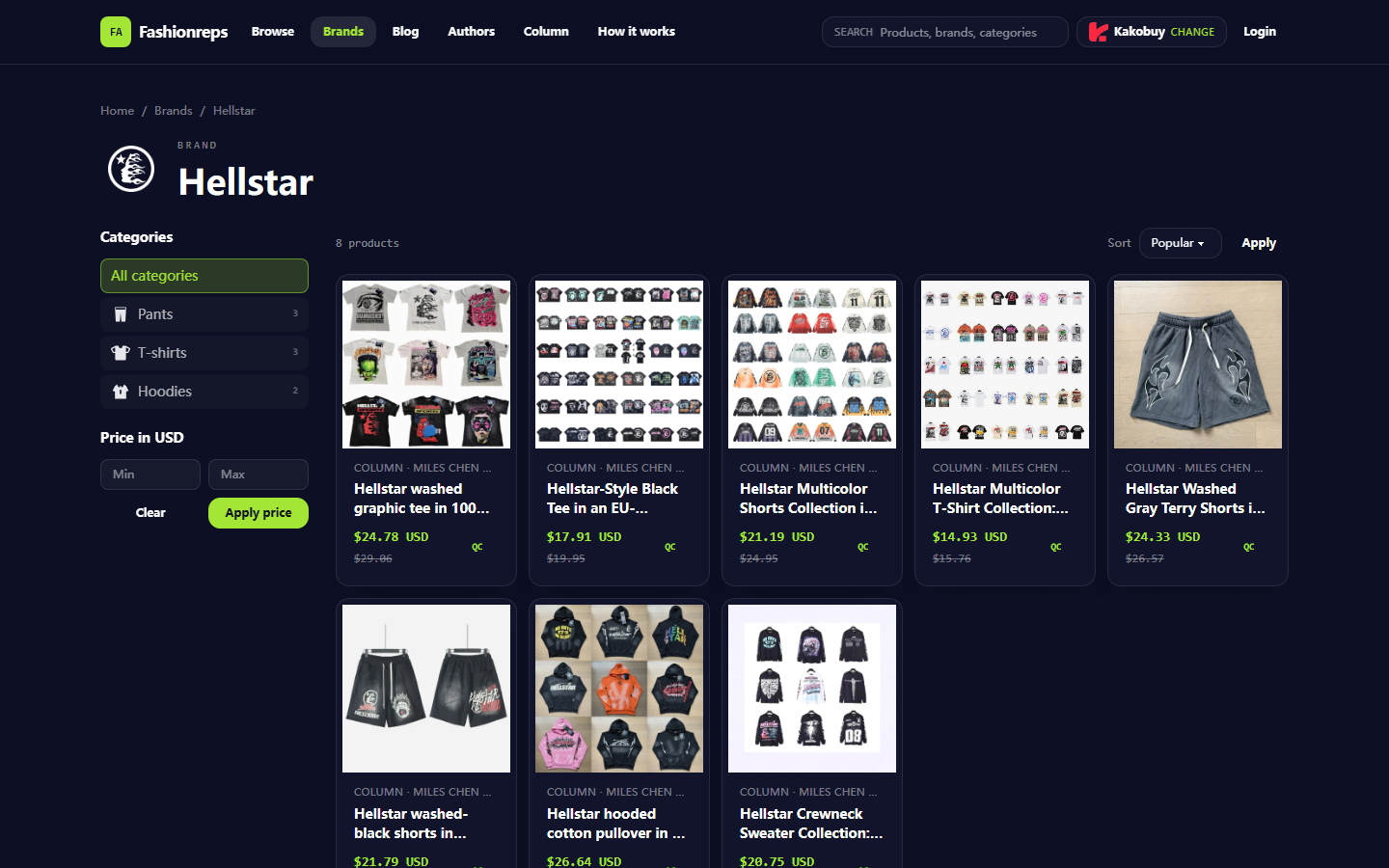
The currently visible Hellstar brand page contains multiple categories and product entries, listing product names, edit columns, and some reference prices. The page does not automatically prove packaging method, stock status, final weight, or destination country shipping costs just by listing products. Price, stock, and page status are time-sensitive information that needs to be reconfirmed before submission.

The image information can only help identify product entry and platform processes, and cannot serve as evidence that the actual package has adopted a certain packaging.
How to compare product page, checkout page, and agent instructions field by field
When placing the same item into a comparison table, keep field names consistent. If a field exists in one place but is empty in another, do not fill it in yourself.
| Verification Field | What to confirm on product page | What to confirm on checkout page or agent | Conclusion standard |
|---|---|---|---|
| Product identity | Product name, category, color, size, quantity | Corresponding variant and quantity in cart | The two must clearly correspond, cannot match by brand name alone |
| Packaging contents | Whether box, bag, tags, or accessories are mentioned | Whether packaging options, seller notes, or warehouse notes are listed | The same packaging requirement must have clear records, otherwise mark as pending confirmation |
| Weight and dimensions | Whether the page provides product or packaging dimensions | Warehouse measured weight, length, width, height, volumetric weight rules | Warehouse measurements and line rules determine shipping feasibility |
| Order status | Whether the page is still accessible | Pending payment, purchased, inbound, pending inspection, or pending shipment | Status does not reach shippable stage, must not judge prematurely |
| Shipping conditions | Usually not fully shown | Destination country, shipping line, restricted items rules, and fees | Only after agent and line information are clear can you judge |
When comparing, distinguish between "product packaging" and "shipping outer packaging." The seller may provide a product bag, but the agent warehouse may still re-box; the product page mentions a cardboard box, but that doesn't mean the box will be placed as-is into the final package. 📋
Evidence boundaries between packaging descriptions and actual shipping restrictions
Different evidence supports different strengths of conclusions:
- Product page copy can support "the page says so," but cannot alone support "the warehouse definitely received that packaging."
- Product images can help identify appearance, but cannot prove packaging material, weight, crush resistance, or included accessories.
- Checkout page can support "the current order selected a certain variant or service," but cannot replace measured data after inbound.
- Warehouse photos can confirm the visible packaging and product condition at the time, but attention should be paid to photo angles, obstructions, and whether all accessories are included.
- Warehouse measured weight and dimensions can support package calculation, but still need to be combined with destination country and specific line billing rules.
- Agent customer service replies can explain operating rules, but keep the original reply, time, and corresponding order; don't paraphrase verbal summaries into permanent policies.
If the page only says "complete packaging," "standard packaging," or similar vague expressions, record it as an undefined field. Don't interpret "complete" as including box, tags, or suitable for long-distance transport.
Review sequence when information is inconsistent
First lock down the product and order scope
Confirm that the product page, cart, and order refer to the same item. Check brand, category, color, size, quantity, and seller information. When multiple items appear simultaneously, create records for each individually; don't use one product's packaging description to cover the entire order.
Then save the original visible content
Save the product page text, screenshot, page status, and verification time. If the page redirects, loads incompletely, or appears blank, mark the page as unavailable; don't infer current packaging from search snippets or old screenshots.
Check whether the checkout page changed conditions
Check whether the cart or checkout page shows new packaging options, service fees, weight estimates, seller notes, or stock alerts. When the checkout page lacks corresponding fields, it doesn't mean packaging doesn't exist; it only means the current interface doesn't provide confirmable information.
Wait for warehouse information before judging physical packaging
If the order has been purchased and is in the warehouse, check warehouse photos, item quantity, outer packaging condition, measured weight, and dimensions. Accessories not visible in photos must not be assumed missing or present; ask the agent for specific confirmation.
Finally check destination country and line restrictions
Enter the actual destination country; do not substitute the agent's location or the product's shipping origin. Confirm whether the line accepts the items, whether there are size or weight limits, whether additional packaging requirements exist, and whether fees are based on actual weight or volumetric weight. 🌍
When to stop combining packages or submitting orders
If any of the following occurs, pause further action:
- Product identity, color, size, or quantity cannot be matched item-by-item with the order.
- Product page and checkout page descriptions of packaging contents conflict, and there is no verifiable reply from the seller or agent.
- Warehouse photos show damaged, deformed, damp packaging, or missing key accessories, and you haven't confirmed acceptance.
- Warehouse hasn't provided measured weight and dimensions, but you plan to choose a volume- or weight-sensitive shipping line.
- Destination country, line, or product restrictions are unclear, especially when the agent page indicates manual confirmation is needed.
- After combining, individual items cannot be distinguished, or combining obscures quantity, packaging, and inspection issues.
- The page is still loading, redirecting, showing a blank page, or lacking enough visible information to identify the product.
Pausing does not mean canceling the order. Keep the order, product records, and existing evidence, and then ask the corresponding shopping agent. Do not delete packaging, modify product quantity, split the order, or select declaration information that doesn't match the actual situation just to make the page show "submittable." 🚫
Checklist of materials to provide when submitting questions to official customer service
Customer service should be able to locate the product and order from a single inquiry. It's recommended to provide:
- Agent order number or warehouse order number; before sharing publicly, redact name, phone, address, payment information, and complete shipping label.
- Product name, color, size, quantity, and seller information from the product page.
- Screenshots of the product page and checkout page, marking the specific conflict points.
- Warehouse photos, inbound status, measured weight and dimensions; if no data, clearly write "not yet provided."
- Destination country, planned shipping line, and the specific question you want confirmed.
- Items that need a clear answer from customer service, such as "Does it include the original product packaging," "What is the expected outer box size after combining," "Does this line accept the current dimensions."
Questions should be factual and answerable whenever possible; don't just ask "Can it ship?" For example, you can ask customer service to confirm: whether the current packaging is seller packaging, whether the warehouse will change the outer box, how fees are calculated, whether splitting is needed, and what formal options are available if conditions cannot be met.
Shipping condition checklist after troubleshooting
Before paying, combining, or submitting for shipment, confirm each of the following:
- Product identity and variants have been checked.
- Product page, checkout page, and warehouse records have no unexplained critical conflicts.
- Packaging description distinguishes between product packaging and shipping outer packaging.
- Warehouse photos and measured data have been saved; missing items are clearly marked.
- Destination country and line conditions have been checked.
- Estimated fees use the correct currency and note the calculation basis and verification date.
- Items requiring customer service confirmation have received a savable formal reply.
- Combining or splitting decisions are based on the current sample, not on universal experience.
- Personal information has been redacted in externally shared screenshots.
Combining may reduce duplicate initial weight or handling costs, but may also increase volumetric weight, single-loss risk, and package value; splitting may increase fixed fees but may resolve line restrictions or reduce per-package risk. The final choice should be based on the current items' quantities, measured dimensions, destination country rules, and agent quotes.
Cost savings: can only be calculated after obtaining actual combining and splitting quotes, not estimated from product page prices alone.
Increased risk: combining may make the package larger and heavier, and may cause a single loss or damage to affect more items; splitting may increase multiple handling and shipping costs.
Suitable users: buyers who have complete warehouse data, can confirm destination country and line, and are willing to keep verification records.
Conditions under which this approach is not recommended: packaging contents still unclear, product or order identity cannot be matched, line restrictions unconfirmed, or the agent cannot provide necessary weight, dimensions, and fee basis.
After completing these checks, if you still cannot confirm shipping conditions, keep the order and wait for a formal reply from the agent or seller, rather than continuing to submit based on one packaging phrase on the product page.
Article image
Daniel Reyes is Editor-in-Chief, covering cross-border shopping agents, QC photo review, warehouse consolidation, and shipping-line comparison. They write most of the agent-fee and shipping-line explainers, maintain the desk's five-point scoring standard, and sign off on every published score. Each review receives two checks: the order log of agent fee, QC time, shipping line, and arrival date, followed by the bench notes. Before a new score goes live, Daniel compares it with the last six months of retests, connecting the review's explanations, test records, and scoring checks.