How to Organize Patagonia Fleece Spreadsheets with Links
- Published
- Updated
What This Task Aims to Solve for Organizing Patagonia Fall/Winter Fleece Candidates If your goal is to save a batch of Patagonia fall/winter fleece candidates and later check each item's product link, color, size, images, and notes, the most practical approach is not to treat the website page as your product database, nor to treat Google Sheets as a quality assurance tool, but to use them separately: first discover candidates in the fashion-reps pro
Editor score 4.2 / 5
Menu
What This Task Aims to Solve for Organizing Patagonia Fall/Winter Fleece Candidates
If your goal is to save a batch of Patagonia fall/winter fleece candidates and later check each item's product link, color, size, images, and notes, the most practical approach is not to treat the website page as your product database, nor to treat Google Sheets as a quality assurance tool, but to use them separately: first discover candidates in the fashion-reps product catalog, then organize the information that needs review into Google Sheets.
After completing this task, you should be able to do three things: save the original page entry for each candidate, distinguish between confirmed fields and fields pending verification, and leave clear records for the next steps of price, inventory, size, or QC checks. Page features and fields may change, and the following judgments are based on the page content seen on October 15, 2026. 🔎
This method is suitable for readers who are still in the early stage of candidate selection, not for using spreadsheet records directly as inventory confirmation, quality assurance, authenticity verification, or proof of completed purchase.
How to Locate Target Categories and Product Cards in the fashionreps Website Spreadsheet
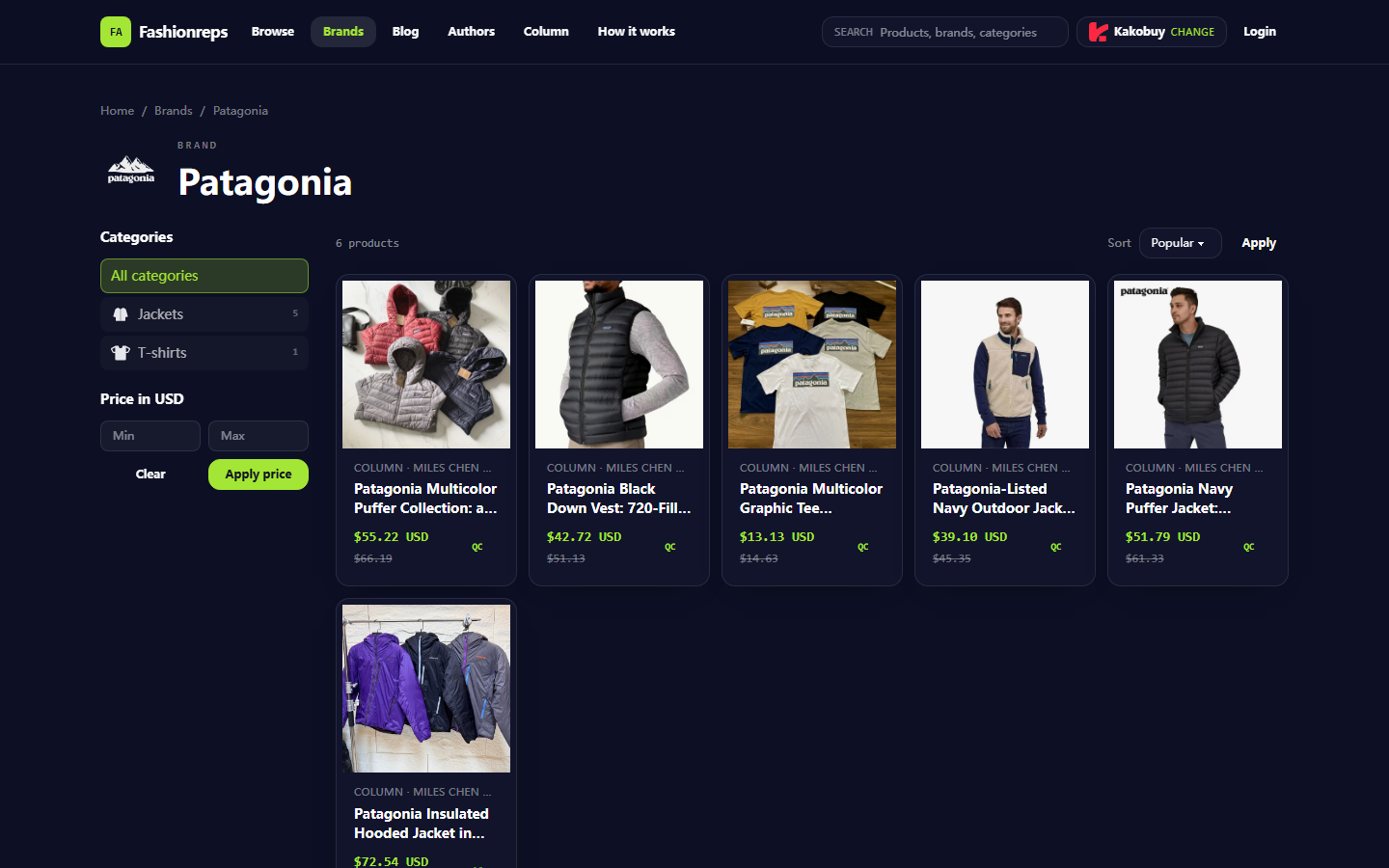
fashion-reps is more like a discovery entry point where you browse by brand, category, and product cards. On the Patagonia brand page, for example, you can see brand filters, category filters, USD price range, sorting options, and product cards; at that time the page displayed categories including Jackets and T-shirts, and listed 6 products. The page itself may not have "fall/winter fleece" as an independent, stable filter, so you cannot simply treat all results as fleece candidates just because the Patagonia label is present.
It is recommended to narrow down in the following order:
- Enter the Patagonia brand page and first observe the currently visible categories, rather than assuming a Fleece category exists.
- Use the product name, card image, and visible description to determine whether it is worth entering the candidate list.
- Keep the original page for suspected fleece items, not just the image or a short copied name.
- After opening the product details, check whether there is enough name, image, color, size, or seller information to support later verification.
- If the page is empty, a pure tag page, inaccessible, or lacks clear product information, mark it as pending confirmation and do not include it as a valid candidate.
The reference price visible on the page can only serve as a record during the discovery phase. It is not equivalent to current inventory, final payment amount, international shipping, taxes, or after-sales results. fashion-reps' page states that its role is to help users discover products, view independently organized product information, and compare shopping agents; actual orders, payment, and logistics are still handled by the chosen agent website. 🧭
How to Set Up Columns for Links, Colors, Sizes, and Verification Notes in Google Sheets
The value of Google Sheets lies in turning scattered product page information into a filterable, supplementable, and collaborative worksheet. It is recommended to save only one candidate product per row to avoid stuffing multiple colors or sizes into a single cell and losing filtering ability.
You can start with the following fields:
| Field | Suggested Recording Method | Verification Boundary |
|---|---|---|
| Candidate Name | Keep the page-visible name, and if necessary, set an internal short name | Do not add materials or models that are not on the page |
| Product Link | Save the original product detail page entry | A link opening does not mean the product is still in stock |
| Brand and Category | Record Patagonia, suspected fleece, outerwear, etc. | Write "suspected" and "confirmed" separately |
| Color | Record according to page-visible options or images | Image color cannot replace page option confirmation |
| Size | Record the sizes listed on the page and any pending measurement status | Do not treat generic size charts as the product's actual measurements |
| Page Price | Keep currency, displayed value, and verification date | Does not represent final payment, shipping, or taxes |
| Page Update Time | Only fill in if there is a specific date | If no date, write "not shown on page" |
| Images and Details | Record whether there are front, back, label, or size images | Images only support visible information judgments |
| Verification Notes | State what is confirmed, what needs supplement, and doubts | Do not write conclusion without evidence like "good quality" or "authentic" |
| Next Step | For example, recheck size, ask about inventory, wait for QC | Have each row lead to an action |
In the spreadsheet, you can use dropdown menus to standardize status, such as "pending initial screening," "link accessible," "pending size supplement," "pending inventory confirmation," "pending QC," "not included." This makes filtering easier than repeatedly using synonyms in notes and reduces differences in understanding among collaborators.
For the link column, it is recommended to use the complete page entry, not just the search results page. If the page later redirects, shows empty content, or the product name disappears, keep the original record and write the recheck result in the status column, rather than silently deleting the candidate. 📋
Differences in Operation Between Website Image Browsing and Spreadsheet Filtering for Candidate Initial Screening
The website and the spreadsheet solve different problems. The website is good for continuous image viewing, opening product cards, and understanding page context; Google Sheets is good for side-by-side comparison of candidates, filtering missing fields, and assigning recheck tasks.
Website browsing is better for:
- Judging whether a product is relevant to fall/winter wear scenarios.
- Comparing card images and product names to exclude clearly irrelevant results.
- Entering the detail page to confirm whether there is visible information such as colors, sizes, or images.
- Observing whether the page is still accessible and whether the product entry has any abnormalities.
Google Sheets is better for:
- Filtering all candidates that lack size notes.
- Grouping by color, category, page status, or verifier.
- Comparing page prices and information completeness of multiple candidates.
- Recording recheck results for the same link on different dates.
- Letting another collaborator handle only rows marked "pending image supplement" or "pending inventory confirmation."
Do not use spreadsheet sorting results to infer product quality, nor use the number of website images to infer inventory stability. A page can be rich in images but lack size data; another page may have fewer fields but is sufficient to proceed to the next step of manual confirmation.
How to Recheck Product Links, Page Update Times, and Missing Fields One by One
After completing the first round of organization, it is recommended to recheck each row in a fixed order:
- Link check: Open the original product page and confirm it does not redirect to an unrelated category, login error page, or blank page.
- Product identity check: Verify that the page name, brand, and images still correspond to the same candidate.
- Category check: Confirm that it is indeed worth further study as a fall/winter fleece candidate; do not judge solely by the brand label.
- Color check: Record the colors explicitly listed on the page; if colors only appear in images, note as "observed from image."
- Size check: Record visible sizes and note whether there is a product-specific size chart or measurement image.
- Price check: Keep the currency and date; do not write a historical reference price as the current transaction price.
- Time check: If the page shows an update time, fill in the original value; if not, do not speculate.
- Missing field check: Use clear status to mark missing information and write the next action.
You can add two columns in the spreadsheet: "last recheck date" and "recheck result." This way, when prices, images, or page entries change, collaborators can see whether the record is old data or newly reconfirmed data.
For candidates that need further purchase, the next stage should also confirm at the chosen shopping agent whether the product can be ordered, the current price, available sizes, domestic shipping, and subsequent QC process. The discovery information on fashion-reps pages cannot replace the order status on the agent website. 🧾
Which Scenarios Are Suitable for Quick Website Discovery vs. Deep Organization in Google Sheets
If the number of candidates is very small, and you just want to quickly view images and product entries, website browsing is usually sufficient. If the number of candidates increases, or multiple people need to review together, Google Sheets is more suitable as a workbench.
| Work Scenario | Better on Website Page | Better in Google Sheets |
|---|---|---|
| Initial product discovery | Browse brands, categories, cards, and images | Record products entering the candidate list |
| Judging relevance | View page context and visible descriptions | Mark "include," "pending confirmation," or "exclude" |
| Side-by-side comparison of multiple products | Need to open pages repeatedly | Filter by color, price, size, and status |
| Managing missing fields | Not suitable for continuous tracking | Suitable for creating to-do columns and assignee columns |
| Collaborative review | Depends on back-and-forth page communication | Share notes, dates, and recheck results |
| Pre-purchase confirmation | Only provides the discovery entry | Summarize questions to further confirm with the agent |
When combining the two tools, it is recommended to keep a "source page" field and an "internal judgment" field. The former only records page-visible facts, and the latter records work judgments such as "suitable for continued verification" or "suspected not fleece," avoiding presenting speculation as platform information.
Boundaries: Do Not Treat Spreadsheet Records as QC, Inventory, or Quality Assurance
The candidate list is only a research and organization tool, not a QC report. Even if a product page has multiple images, you cannot confirm fabric feel, warmth, workmanship stability, actual dimensions, or received condition.
Similarly, "link accessible" in the spreadsheet does not mean "can be ordered"; "size shown on page" does not mean "currently in stock"; "reference price" does not equal "final cost." These judgments must be reconfirmed in the corresponding shopping agent process.
If entering the purchase stage, at least continue to check:
- Whether the chosen agent can still accept the product link.
- Whether the product is currently orderable and whether size and color are selectable.
- Order price, domestic shipping, service fees, and possible international fees.
- After arrival at the warehouse, whether QC images or inspection results matching the order can be obtained.
- Who is responsible for returns, cancellations, and after-sales windows, and under what conditions.
Do not record order numbers, complete shipping addresses, phone numbers, payment card information, or passport information in a public spreadsheet. When sharing screenshots, first obscure personal information.
Combining Both Tools to Complete Candidate Saving and Next-Step Verification
An executable workflow can be divided into four rounds:
Round 1: Browse brands and categories on the fashion-reps Patagonia page to find candidates related to fall/winter fleece. Do not assume all results belong to the target category just because the brand name is displayed.
Round 2: Add products worth further viewing to Google Sheets row by row, saving the original product entry, page name, color, size, displayed price, image situation, and verification date.
Round 3: Filter by "link status," "missing fields," and "next step," prioritizing candidates that cannot be opened, lack sizes, or have unclear categories. Update the date and result for each recheck without overwriting old key judgments.
Round 4: Only send candidates that are complete and truly worth further study to the shopping agent process, reconfirming orderability, current price, and selectable specifications; the QC results after arrival at the warehouse should be saved separately and cannot be backfilled as facts already proven by the product page.
The final result is not a seemingly neat but vaguely meaningful list, but a set of records that can answer "where did this candidate come from, what information is confirmed, what still needs verification, and who will complete the next step." In this way, the website handles discovery, Google Sheets handles organization, the shopping agent handles orders and logistics, and QC handles physical inspection after arrival, with clearer boundaries. ✅

Daniel Reyes is Editor-in-Chief, covering cross-border shopping agents, QC photo review, warehouse consolidation, and shipping-line comparison. They write most of the agent-fee and shipping-line explainers, maintain the desk's five-point scoring standard, and sign off on every published score. Each review receives two checks: the order log of agent fee, QC time, shipping line, and arrival date, followed by the bench notes. Before a new score goes live, Daniel compares it with the last six months of retests, connecting the review's explanations, test records, and scoring checks.