Moncler Green Tee Catalog vs Sheets
- Published
- Updated
First Confirm: The Current Page Does Not Prove a Green Tee Candidate Exists If your goal is to organize Moncler green tees, the first step is not to copy product names into a spreadsheet, but to confirm whether the fashionreps brand catalog actually displays items that meet your criteria. The verified Moncler × Fragment page shows catalog information such as brand filter, category filter, price filter, and product cards, b
Editor score 4.2 / 5
Menu
First Confirm: The Current Page Does Not Prove a Green Tee Candidate Exists
If your goal is to organize Moncler green tees, the first step is not to copy product names into a spreadsheet, but to confirm whether the fashionreps brand catalog actually displays items that meet your criteria.
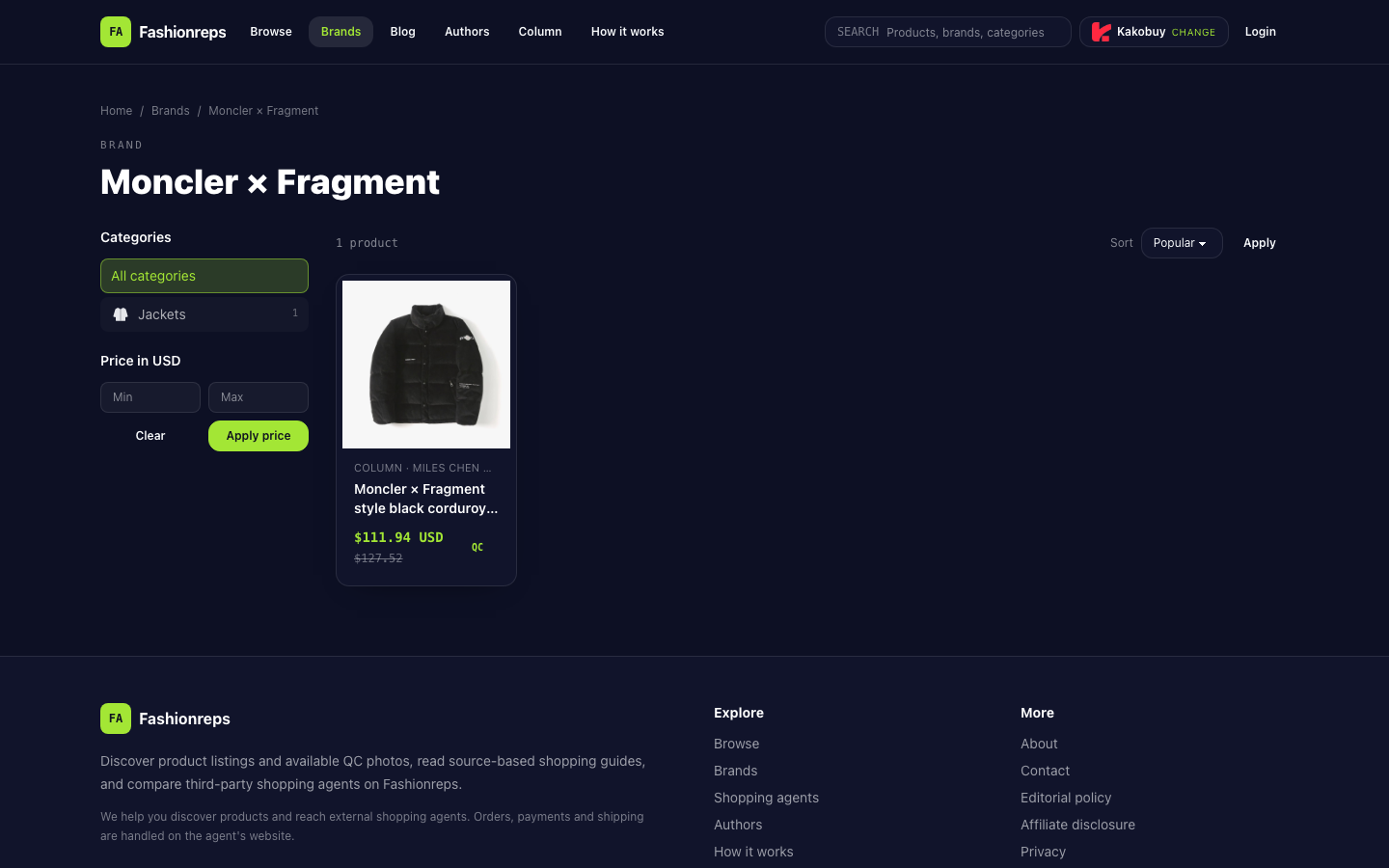
The verified Moncler × Fragment page shows catalog information such as brand filter, category filter, price filter, and product cards, but the currently visible result is 1 jacket-type item: a black corduroy down jacket, labeled as 90% white goose down, with reference price $111.94, previous reference price $127.52, and a QC image entry. Existing evidence does not show a Moncler green tee, so it cannot be considered a found purchasable candidate, nor can inventory, shipping, or sizing be inferred from it.

What the Site Catalog and Google Sheets Each Solve
The site catalog is good for discovering and opening candidates. You can first go to the Moncler-related brand page, then observe whether categories, search results, product cards, image entries, and detail page links actually exist. Product titles, page images, and links in the catalog are original verification materials and cannot be replaced by text in your personal spreadsheet.
Google Sheets is good for saving records you have already verified. It can put candidates from different pages into one sheet, making it easy to filter by color, size status, evidence completeness, and pending items. But the sheet does not automatically prove that the product is still online, or that price, inventory, or image content have not changed.
| Verification Task | Site Catalog | Google Sheets |
|---|---|---|
| Discover Moncler candidates | View pages via brand, category, and search results | Does not discover original products |
| View product images and details | Open product card or detail page | Save image evidence notes or page records |
| Organize by personal criteria | Rely on existing page filters | Can filter by color, size, and status |
| Recheck if page is still valid | Reopen original page | Can only record last recheck result |
| Collaborative notes | Depends on website's page features | Multiple people can add personal verification fields |
Suggested Minimum Verification Sheet
Don't start with too many fields. For a single brand candidate, first keep fields that allow you to go back to the original page and decide next steps.
| Field | How to Record | Verification Focus |
|---|---|---|
| Product title | Copy page title exactly | Don't replace original with your own abbreviation |
| Target color | Record color explicitly stated on page | Mark as pending if page doesn't state it |
| Available sizes | Record page display exactly | Don't add based on common size experience |
| Page link | Copy product detail URL | Confirm it's not broken or redirected incorrectly |
| Image evidence | Record whether image is visible and its position | Don't treat illustration as actual or QC evidence |
| Verification status | E.g., pending recheck, insufficient evidence, stopped | Status must correspond to actual check result |
| Pending items | Record doubts about color, size, price, or inventory | Don't fill blanks with guesses |
If the current page has no green tee, do not create a row that looks like a confirmed green tee. You can create a separate "target candidate not found" record in the sheet, noting the verification date, the page range checked, and the reason for stopping. This prevents collaborators from mistaking an unverified name for a product fact.
Verification Steps from Catalog to Sheet
1. First Define Target Conditions
Write the target as checkable conditions, e.g., brand is Moncler, category is tee, color is green. Do not treat "looks green" or "might be short-sleeve" as confirmed conditions.
2. Check Actual Results on Brand Page
After entering the Moncler-related catalog, look at the categories and item count shown. The currently verified page shows category Jackets, result count 1, and the product is a black corduroy down jacket. This result only shows that the page currently displays this one jacket candidate and cannot be extended to claim a green tee exists.
3. Open Product Card and Detail Page
If a suspected green tee appears, check title, color field, image, size field, and detail page URL one by one. If any key field is missing, keep "pending" in the sheet; do not fill with search snippets or personal judgment.
4. Copy Original Information
Copy the page title and link to the sheet, note whether images open, whether QC images exist, and whether the page explicitly states color and size. Anything not shown on the product page should be recorded as "not shown on page".
5. Perform a Follow-up Recheck
After saving, reopen the link to confirm it still points to the same product page. If the page is dead, delisted, empty, or cannot confirm the original product, change status to stopped or pending recheck, and do not recommend it as purchasable.
When to Stop
Stop making specific assertions and do not continue refining the sheet in these cases:
- Catalog does not show any item matching target conditions.
- Page title does not match target category.
- Color comes only from personal observation, with no clear text or reliable image evidence on page.
- Size field missing, or can only be inferred from other products.
- Page link broken, redirects incorrectly, or cannot confirm corresponding product.
- Price, inventory, shipping, or purchase process not directly supported by current evidence.
This page verification can only support that the Moncler × Fragment page has one black corduroy down jacket candidate with its stated details; it cannot support that a Moncler green tee has appeared in the catalog. If new pages are found later, recheck the original page before adding evidence-based fields to the sheet.
Final Judgment
For this task, the site catalog should serve as the entry point for candidate discovery and original page verification, and Google Sheets should serve as a tool for personal records, filtering, and collaborative additions. They are not substitutes: a sheet can organize evidence but cannot create product, image, size, or inventory facts.
Therefore, the safest process is to first confirm that a green tee candidate actually exists on fashionreps, then copy page fields to create a record; if the catalog currently has no matching result, record "not found" and the stopping reason in the sheet instead of entering unverified product information.
Daniel Reyes is Editor-in-Chief, covering cross-border shopping agents, QC photo review, warehouse consolidation, and shipping-line comparison. They write most of the agent-fee and shipping-line explainers, maintain the desk's five-point scoring standard, and sign off on every published score. Each review receives two checks: the order log of agent fee, QC time, shipping line, and arrival date, followed by the bench notes. Before a new score goes live, Daniel compares it with the last six months of retests, connecting the review's explanations, test records, and scoring checks.